

Ovis1.6
Collection
With 29B parameters, Ovis1.6-Gemma2-27B achieves exceptional performance in the OpenCompass benchmark, ranking among the top-tier open-source MLLMs. • 5 items • Updated • 13

It is recommended to use the latest version: Ovis2.5.
We are excited to announce the open-sourcing of Ovis-1.6, our latest multi-modal large language model. Ovis is a novel Multimodal Large Language Model (MLLM) architecture, designed to structurally align visual and textual embeddings.
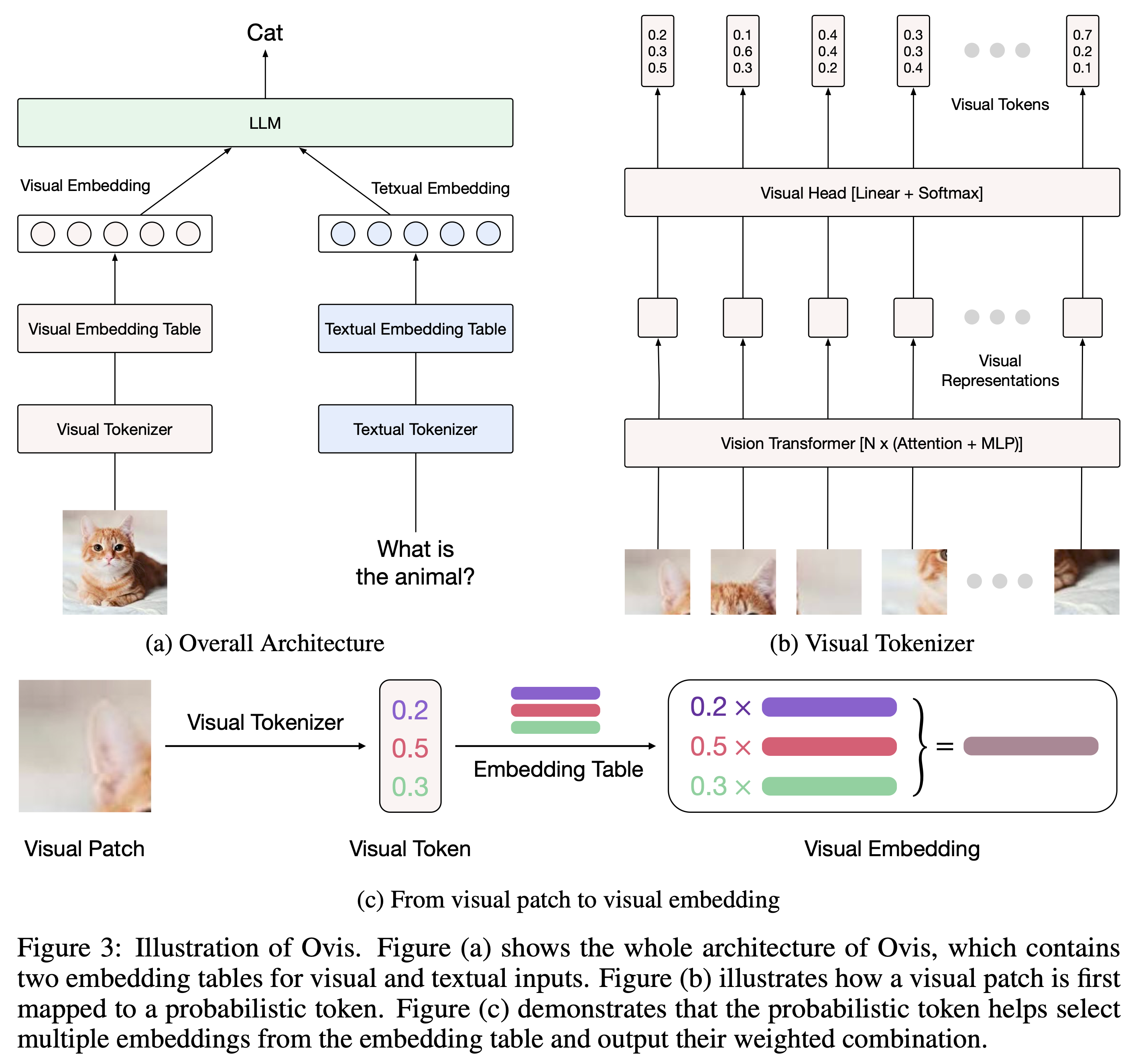
Built upon Ovis1.5, Ovis1.6 further enhances high-resolution image processing, is trained on a larger, more diverse, and higher-quality dataset, and refines the training process with DPO training following instruction-tuning.
| Ovis MLLMs | ViT | LLM | Model Weights | Demo |
|---|---|---|---|---|
| Ovis1.6-Gemma2-27B | Siglip-400M | Gemma2-27B-It | Huggingface | - |
| Ovis1.6-Gemma2-9B | Siglip-400M | Gemma2-9B-It | Huggingface | Space |
| Ovis1.6-Llama3.2-3B | Siglip-400M | Llama-3.2-3B-Instruct | Huggingface | Space |
With just 10B parameters, Ovis1.6-Gemma2-9B leads the OpenCompass benchmark among open-source MLLMs within 30B parameters.

Below is a code snippet to run Ovis with multimodal inputs. For additional usage instructions, including inference wrapper and Gradio UI, please refer to Ovis GitHub.
pip install torch==2.2.0 transformers==4.44.2 numpy==1.24.3 pillow==10.3.0
import torch
from PIL import Image
from transformers import AutoModelForCausalLM

# load model
model = AutoModelForCausalLM.from_pretrained("AIDC-AI/Ovis1.6-Gemma2-9B",
                                             torch_dtype=torch.bfloat16,
                                             multimodal_max_length=8192,
                                             trust_remote_code=True).cuda()
text_tokenizer = model.get_text_tokenizer()
visual_tokenizer = model.get_visual_tokenizer()

# enter image path and prompt
image_path = input("Enter image path: ")
image = Image.open(image_path)
text = input("Enter prompt: ")
query = f'<image>\n{text}'

# format conversation
prompt, input_ids, pixel_values = model.preprocess_inputs(query, [image])
attention_mask = torch.ne(input_ids, text_tokenizer.pad_token_id)
input_ids = input_ids.unsqueeze(0).to(device=model.device)
attention_mask = attention_mask.unsqueeze(0).to(device=model.device)
pixel_values = [pixel_values.to(dtype=visual_tokenizer.dtype, device=visual_tokenizer.device)]

# generate output
with torch.inference_mode():
    gen_kwargs = dict(
        max_new_tokens=1024,
        do_sample=False,
        top_p=None,
        top_k=None,
        temperature=None,
        repetition_penalty=None,
        eos_token_id=model.generation_config.eos_token_id,
        pad_token_id=text_tokenizer.pad_token_id,
        use_cache=True
    )
    output_ids = model.generate(input_ids, pixel_values=pixel_values, attention_mask=attention_mask, **gen_kwargs)[0]
    output = text_tokenizer.decode(output_ids, skip_special_tokens=True)
    print(f'Output:\n{output}')
batch_inputs = [
    ('example_image1.jpeg', 'Describe the content of this image.'),
    ('example_image2.jpeg', 'What is the equation in the image?')
]

batch_input_ids = []
batch_attention_mask = []
batch_pixel_values = []

for image_path, text in batch_inputs:
    image = Image.open(image_path)
    query = f'<image>\n{text}'
    prompt, input_ids, pixel_values = model.preprocess_inputs(query, [image])
    attention_mask = torch.ne(input_ids, text_tokenizer.pad_token_id)
    input_ids = input_ids.unsqueeze(0).to(device=model.device)
    attention_mask = attention_mask.unsqueeze(0).to(device=model.device)
    pixel_values = [pixel_values.to(dtype=visual_tokenizer.dtype, device=visual_tokenizer.device)]
    batch_input_ids.append(input_ids.squeeze())
    batch_attention_mask.append(attention_mask.squeeze())
    batch_pixel_values.append(pixel_values)

pad_batch_input_ids = torch.nn.utils.rnn.pad_sequence([i.flip(dims=[0]) for i in batch_input_ids],batch_first=True, padding_value=0.0).flip(dims=[1])
pad_batch_input_ids =  pad_batch_input_ids[:,-model.config.multimodal_max_length:]
pad_batch_attention_mask = torch.nn.utils.rnn.pad_sequence([i.flip(dims=[0]) for i in batch_attention_mask],batch_first=True, padding_value=False).flip(dims=[1])
pad_batch_attention_mask = pad_batch_attention_mask[:,-model.config.multimodal_max_length:]
pad_batch_pixel_values = [item for sublist in batch_pixel_values for item in sublist]

# generate output
with torch.inference_mode():
    gen_kwargs = dict(
        max_new_tokens=1024,
        do_sample=False,
        top_p=None,
        top_k=None,
        temperature=None,
        repetition_penalty=None,
        eos_token_id=model.generation_config.eos_token_id,
        pad_token_id=text_tokenizer.pad_token_id,
        use_cache=True
    )
    output_ids = model.generate(pad_batch_input_ids, pixel_values=pad_batch_pixel_values, attention_mask=pad_batch_attention_mask, **gen_kwargs)

for i in range(len(batch_input_ids)):
    output = text_tokenizer.decode(output_ids[i], skip_special_tokens=True)
    print(f'Output_{i}:\n{output}')
If you find Ovis useful, please cite the paper
@article{lu2024ovis,
  title={Ovis: Structural Embedding Alignment for Multimodal Large Language Model},
  author={Shiyin Lu and Yang Li and Qing-Guo Chen and Zhao Xu and Weihua Luo and Kaifu Zhang and Han-Jia Ye},
  year={2024},
  journal={arXiv:2405.20797}
}
This project is licensed under the Apache License, Version 2.0 (SPDX-License-Identifier: Apache-2.0).
We used compliance-checking algorithms during the training process, to ensure the compliance of the trained model to the best of our ability. Due to the complexity of the data and the diversity of language model usage scenarios, we cannot guarantee that the model is completely free of copyright issues or improper content. If you believe anything infringes on your rights or generates improper content, please contact us, and we will promptly address the matter.